
Create Google Forms with AI: pipiform Add-on and App
In this guide
Use GPT for Google Forms by pipiform add-on for an AI-assisted desktop workflow, or the separate Forms for Google Drive app for mobile form creation. Start with a clear brief, generate a draft through the product you choose, then review the questions before sharing the form.
This tutorial is published by pipiform, the maker of GPT for Google Forms and Forms for Google Drive.
Install GPT for Google Forms · View features and plans
The useful outcome is an editable form that asks the right questions—not simply a long list of generated questions. This guide uses workshop feedback as an example and explains how to choose a desktop or iPhone route.
Choose the pipiform workflow for your device
| Where you work | Product | Useful starting point |
|---|---|---|
| Google Forms on a computer | GPT for Google Forms add-on | A brief or source material for the form |
| iPhone or iPad | Forms for Google Drive app | A short description of the form you want |
| Reviewing a draft before publishing | Google Forms or your form-management workflow | Question wording, types and required fields |
The app and add-on are separate products with separate access and plans. Installing one is not evidence that the other is unlocked.
Create a useful brief before generating
A specific brief gives the generator less room to invent irrelevant questions. Include the audience, purpose, number of questions and preferred answer types. Here is a workshop example you can adapt:
Create a workshop feedback form with five questions: overall satisfaction,
clarity of the instructor, usefulness of the exercises, the most useful topic,
and one suggested improvement. Use a 1–5 scale for the first three questions
and paragraph answers for the last two.
This brief defines an outcome and limits unnecessary information. For a registration form, replace feedback questions with the attendance details you actually need. For a quiz, supply the learning objectives and review the answer key yourself.
Use GPT for Google Forms on desktop
1. Open the installed add-on
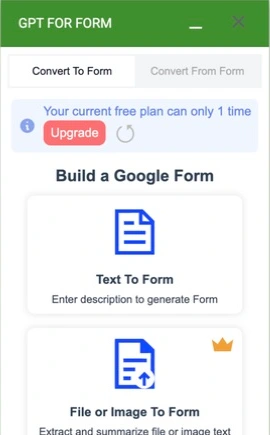
Install GPT for Google Forms with the account you use to edit forms. In the Google Forms editor, click the puzzle-piece Add-ons button, choose GPT for Google Forms™, then click Open. The panel is headed GPT FOR FORM.
Under Convert To Form, choose Text To Form for a written brief. The panel also lists File or Image To Form, Video To Form and Web Page To Form. Check the plan before choosing a premium input method. Start with text when you want to describe a new form without preparing a source file.
2. Enter the brief and match the generation settings
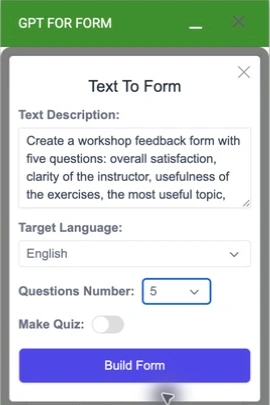
Click Text To Form and paste the workshop brief above into Text Description. Then set:
| Control | Workshop example | Why it matters |
|---|---|---|
| Target Language | English | Select the intended output language explicitly |
| Questions Number | 5 | Match the five questions requested in the brief |
| Make Quiz | Off | Feedback questions do not need correct answers or grading |
For an assessment, use Make Quiz when you need a quiz draft, and review its questions and answer settings before use. A prompt should state the subject, audience and learning objectives rather than relying on the switch to define them.
3. Build and review your form
Check your available generation allowance, then click Build Form. Follow the result shown by the add-on and inspect the generated form before sharing it. For this example, verify that the three rating questions have a 1–5 scale and that the final two questions allow paragraph answers. If the draft differs from your brief, correct it in the editor.
Use a test form for your first attempt. The screenshots above document the input and configuration stages; they do not demonstrate a completed generation. For document, image, video or web-page inputs, choose the corresponding entry and check its requirements and plan availability. The product page explains the available input workflows.
Use the separate iPhone/iPad app when working on mobile
Open Forms for Google Drive, sign in with the Google account you use for forms, and use the app’s AI form-creation entry. Provide a concise description, review the generated questions and adjust the form before sharing.
AI features in the app require the relevant paid access. The app’s US$59.99/year offer and 3-day trial are separate from the Workspace add-on’s plans; confirm the current offer in your App Store region.
View Forms for Google Drive on the App Store
Review the draft as a form creator
Work through the form as a respondent would. For the workshop brief above, check:
- Purpose: every question helps evaluate the workshop.
- Question type: ratings use a meaningful scale; single-choice questions do not require multiple selections.
- Wording: questions are short and do not assume the participant had a positive experience.
- Required fields: optional comments remain optional.
- Privacy: unnecessary contact questions have not appeared.
- Completion: the preview can be submitted with an appropriate fictional response.
For a quiz, verify facts and correct answers independently. Generated content is a draft, even when it looks polished.
Connect the form to the next useful action
Once the questions are ready, you can add a purpose-specific workflow:
- Send a useful acknowledgement with Form Notifications.
- Add an individual countdown to a practice activity with Form Timer.
- Prepare a readable document of the form or answers with Form to Docs.
These are separate setup steps and products. AI generation alone does not configure email delivery, a timed attempt or a finished feedback report.
Where Google’s built-in AI is useful
If your account exposes Help me create a form, Google’s native Gemini workflow lets you draft within Forms without installing this add-on. Google’s current creation instructions describe the desktop workflow; availability depends on the account and offering.
Use that native route when it fits your access and task. Consider pipiform when you want its add-on input workflow or its separate iPhone/iPad app. Avoid choosing from blanket claims that one route is always available, always free or the only possible way to create a form.
Can I use a chat assistant to plan the questions?
Yes. A question draft can be useful even when the tool you use does not insert it into Forms. Whether a particular assistant creates the form directly depends on its available integrations and permissions.
Should I generate all my questions at once?
Begin with a small draft and review it. A clear five-question form is often more useful than a much longer form you have not checked.
Does an AI-generated form include my follow-up emails?
Not automatically. Configure a notification workflow separately when you want a respondent acknowledgement or team routing.
Try it with your own form
Start with the five-question workshop brief, review the generated draft and submit a fictional response. Add the notification or timer workflow only after the form itself is ready.
Install GPT for Google Forms · Review the product and pricing
Check GPT for Google Forms’ current generation allowance and paid options on its product page before generating a large set of forms.
For managing forms and reviewing responses on iPhone or iPad, use the separate Forms for Google Drive app. It complements the desktop add-on workflow; an app subscription does not unlock the add-on. The app is US$59.99/year with a 3-day trial, subject to the offer in your App Store region. View the app on the App Store.