Pipiform Blog
howto · 10 min read

Is There a Google Forms App for iPhone? (2026 Answer)

By Jeremy ·

Is There a Google Forms App for iPhone? The Short Answer Is No

As of 2026, Google does not publish an official Google Forms app for iPhone or iPad — and the company never has. If you have searched the App Store for “Google Forms” and come up empty on a Google-published listing, you have not missed it. It genuinely does not exist.

Google’s Workspace mobile lineup on iOS includes nine apps published under “Google LLC”: Docs, Sheets, Slides, Drive, Gmail, Calendar, Meet, Keep, and Classroom. The one notable absence is Forms. This is consistent with Google’s own Workspace mobile apps overview, which lists every Workspace product available as a native mobile app — Forms is not on it.

After 2+ years building Forms for Google Drive and supporting users across 15+ language markets, we have fielded this exact question thousands of times. The confusion is reasonable: every other major Workspace product has a dedicated iOS app, so the gap stands out and people assume they must be looking in the wrong place.

App Store search results for "Google Forms" showing only third-party apps, no Google LLC listing

Why Hasn’t Google Built an iOS App for Forms?

Google’s mobile strategy for Forms is web-first, and there are several observable reasons the company has stayed there for over a decade.

The product is creation-heavy. Forms is primarily used to build surveys, quizzes, and registration flows — work that Google treats as a desktop activity within its product hierarchy. Filling out a form (the respondent side) already works well on any phone browser; that is where Google has invested.

The mobile web is already mobile-optimized. forms.google.com loads a responsive editor on iPhone and iPad. From Google’s perspective, the marginal gain of shipping a native iOS app for a creation tool is small. Docs and Sheets, which are higher-priority products, took years to get native iOS apps themselves — Docs and Sheets both shipped on iOS in 2014, several years after their web-only debut. Forms has not crossed that threshold.

Forms gets less product investment than its peers. Inside Workspace, Forms has historically been the smallest engineering investment of the editor suite. It is a popular tool but not a strategic priority, and a native iOS app would require a sustained team to keep pace with the iOS release cycle, App Store reviews, and platform-specific bug surface.

Third-party apps have absorbed the demand. The App Store already lists multiple third-party Google Forms apps for iOS. From a Google product-management view, the gap is filled — imperfectly, by partners — and the case for spending engineering budget to compete with them is weak.

The result is a 10+ year gap with no official iOS app, and no public signal that is changing in 2026.

Your 3 Options for Google Forms on iPhone

Three working paths exist for using Google Forms on iPhone in 2026 — two official, one third-party.

Option 1 — Safari + forms.google.com

The most straightforward path: open Safari, type forms.google.com, sign in with the Google account where you want the form saved. Google’s mobile web editor loads with most desktop features available. You can create new forms, edit existing ones, share via link or QR, and view responses.

What you lose vs. desktop: the date/time picker has known issues on iOS Safari (documented in Google’s own support article), the editor UI is cramped on smaller iPhone screens, and there is no offline support — every save requires a network round-trip.

Option 2 — Google Drive iOS App

The Drive iOS app does not directly edit Forms, but it lists them as files and opens each one in an embedded WebView. That WebView is the same forms.google.com editor as Option 1, just wrapped inside Drive’s interface. It is useful for quickly accessing existing forms when Drive is already open.

A critical limit: Drive offers no “New Google Form” button. To create a form from scratch, you will need to use Safari or a third-party app.

Option 3 — Third-Party iOS Apps

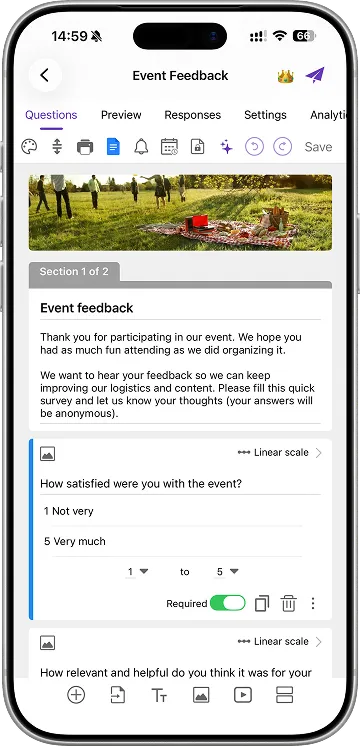
Third-party iOS apps connect to your Google account through OAuth and provide a native iPhone interface on top of Google Forms. The data still lives in Google Forms — these apps do not have their own backend; they read and write the same form your colleagues see at forms.google.com. An edit made in a third-party app appears in the web editor instantly, and vice versa.

The trade-off is paid features in exchange for capabilities the official options do not provide on mobile: a timer, server-side response limits, scheduled close dates, email autoresponders, offline editing, and (in some apps) AI form generation from a single prompt. iOS App for Google Forms™ is one such app; there are others, with varying feature mixes and price points.

Google Workspace iOS apps lineup showing Docs, Sheets, Slides, Drive, Gmail, Calendar, Meet, Keep, and Classroom — but no Forms

Comparison: Safari vs Drive vs Third-Party Apps

The three options solve overlapping problems but differ in capability. The table below is an objective feature comparison — not a recommendation.

FeatureSafari (forms.google.com)Google Drive iOS AppForms for Google Drive (Pipiform)
Create new forms
Edit existing forms✅ (WebView)
All question types
Native iOS UIPartial
Offline form editing
Push notifications on submit
Timer for quizzes
Email autoresponder
Response analyticsBasic
QR code generator
Free to useFree trial, then paid
Published by Google

A few honest notes on the table: Safari’s “Response analytics” entry is “Basic” rather than ❌ because Google Forms does include summary charts in the web editor; the analytics just are not as rich as a dedicated app’s. The Drive app’s “Edit existing forms” is ✅ but functionally identical to Safari since both load the same WebView underneath — the Drive app is convenience packaging, not a separate editor.

When Should You Use Each Option?

The best option depends on how often you build forms and what features you actually need.

  1. Use Safari (Option 1) if you only need an occasional form. A single survey for an upcoming event, a one-off quiz, or quick edits to an existing form — Safari is fine, free, and requires no install. For step-by-step methods to create forms on iPhone using Safari, see our complete guide.

  2. Use the Drive app (Option 2) if you are primarily reading or editing existing forms. Drive is the right home base when forms are part of a broader workflow that also includes Docs and Sheets, and when you do not need creation-from-scratch on mobile.

  3. Use a third-party iOS app (Option 3) if you build forms regularly. Teachers running weekly quizzes, event organizers managing registrations, and HR teams handling onboarding intake hit the limits of Safari quickly. The same is true for anyone who needs a timer, response cap, deadline, or offline editing — none of which the official options provide.

You do not have to pick exclusively. Many people use Safari for occasional forms and a dedicated iOS app for production work. The data lives in Google Drive either way.

Will Google Ever Launch an Official iOS Forms App?

As of 2026, there are no public signals indicating Google plans to ship a dedicated Forms iOS app.

The precedent isn’t entirely against it. Google Docs launched on iOS in 2014 after years of web-only access; Sheets and Slides shipped the same year. Each one followed a similar pattern: web-only for several years, then a native iOS app released after sustained user demand and sufficient internal investment. Forms has been around since 2008 — over a decade longer than Sheets had to wait before getting an iOS app, and still nothing has shipped.

The signals that would suggest a change have not appeared: a public Workspace roadmap entry mentioning a Forms mobile app, an open iOS engineering job posting referencing Forms specifically, or a beta program leak. None of these surfaced in 2026.

For practical purposes, plan around the three options above. Even if Google reverses course, a hypothetical official app would presumably look similar to existing Drive — a thin native shell around the same web editor — and would be unlikely to include the advanced features (timers, offline mode, AI generation, advanced notifications) that third-party iOS apps already offer. Switching cost between the official options and a third-party app is low either way, because all the data lives in Google Drive.

Common Misconceptions

Three persistent misconceptions about Google Forms on iPhone show up in support requests almost every week.

“I downloaded ‘Google Forms’ from the App Store. Is it real?” No. Every iOS app titled “Google Forms” or with similar branding is third-party, regardless of the name. Real Google apps show “Google LLC” as the publisher. Check the publisher field before trusting an app with your Google account — and prefer apps that clearly state they are third-party rather than impersonating the Google brand.

“Can I get Forms through the main Google app on iPhone?” No. The main Google iOS app is a search engine plus Discover feed — it does not include Forms creation, editing, or response viewing. The Google app and Google Forms are separate products that happen to share the brand.

“Does the Google Workspace app include Forms?” There is no unified “Google Workspace” iOS app. Each Workspace product ships as a separate iOS app (Docs, Sheets, Slides, Drive, Gmail, Calendar, Meet, Keep, Classroom). Forms is the one Workspace product that does not ship as an iOS app at all — there is no umbrella app that fills the gap for you.

Summary

There is no official Google Forms iOS app, and no public sign one is coming. Your three working paths are Safari at forms.google.com, the Google Drive iOS app, and third-party iOS apps that wrap Google Forms with a native interface. The right choice depends on how often you build forms and which advanced features (timer, notifications, offline mode, AI generation) you need. For step-by-step methods to create forms using each path, see our complete iPhone guide.

Frequently Asked Questions

I see Google Forms apps on the App Store — are any of them official?

No. Every iOS app titled Google Forms or with similar branding on the App Store is third-party, regardless of name. Google itself does not publish any Forms app in any App Store. Real Google iOS apps show Google LLC as the publisher — check the publisher field before installing anything that asks for your Google account.

Will Google release an official iOS Forms app?

No public roadmap exists as of 2026. Google has shipped iOS apps for Docs, Sheets, Slides, Drive, Gmail, Calendar, Meet, Keep, and Classroom — but not Forms. The company's stated mobile strategy for Forms remains using forms.google.com in a browser, and there is no public signal that is changing.

Are third-party Google Forms iOS apps safe to use?

Yes when they use Google's official OAuth sign-in flow. OAuth means the app never sees your Google password — it only receives scoped access tokens to Forms and Drive that you can revoke at any time at myaccount.google.com under Security → Third-party access. Verify the app is listed in the App Store and check its privacy report before installing.

Can I create a Google Form using just the Google Drive iOS app?

No. The Drive iOS app can open existing forms in a WebView (which is the same forms.google.com editor wrapped inside the Drive app), but it has no New Google Form button. To create a form from scratch on iOS, use Safari directly at forms.google.com or install a third-party iOS form app.

Is Google Forms free on iPhone?

Yes through Safari and the Google Drive iOS app — both are free with no response cap, the same as the desktop version. Third-party iOS form apps typically charge a one-time fee or subscription, with the trade-off being native features Google's free editor does not include such as timers, push notifications, and offline editing.

Does Forms work on iPad differently than iPhone?

Identically through Safari and the Drive app — both render the same mobile web editor regardless of screen size. Some third-party iOS apps optimize specifically for iPad with split-view multitasking and Apple Pencil support, but Google's official options behave the same way across both devices.

What about Google Forms on Android?

Same situation as iOS. Google publishes no native Android Forms app either. The official Android answer is Chrome plus forms.google.com, or the Google Drive Android app for accessing existing forms. Third-party Android form apps fill the same gap they fill on iOS.

Share: Twitter LinkedIn HN